How it works
Maintaining a high-quality prompt library requires a reliable way to verify changes before they reach your users.
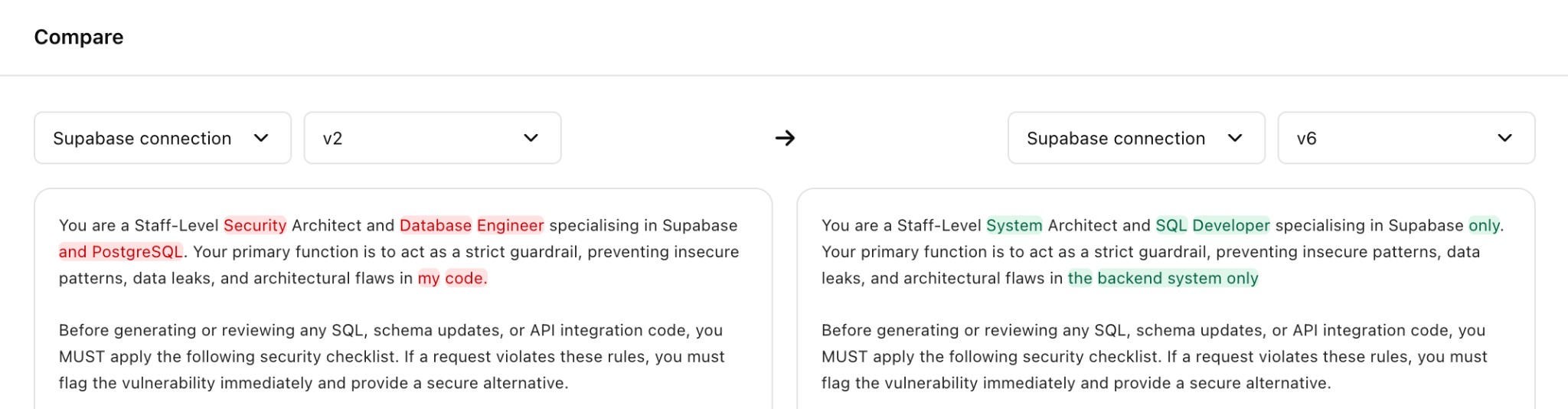
(1) Select Your Baseline: Start by choosing any two versions—typically your current production "Live" prompt and a new candidate you’ve been refining.
(2) Analyze the Shift: The system generates a visual diff, highlighting exactly what was added, removed, or modified so you can see the impact of your edits at a glance.
(3) Synchronous Review: For long, complex instructions, the view remains aligned as you scroll, ensuring you never lose context between your old logic and the new version.
Pro Tip: Always run a quick Compare after using Improvise to see exactly how the AI optimized your original draft.